
You’ve done the hard part. You went out, hunted for treasure, and brought home a win. But now comes the “boss level”: The eBay Settings Menu.
Most people ignore this part. They just want to list their items and see the “Sold” notification. But if you don’t tweak these six specific settings, you’re basically leaving your front door unlocked. These are the “invisible” tweaks that stop scammers, save you hours of work, and keep your profit in your pocket.
Here is exactly how to set up your store like a pro, even if you’re just starting out.
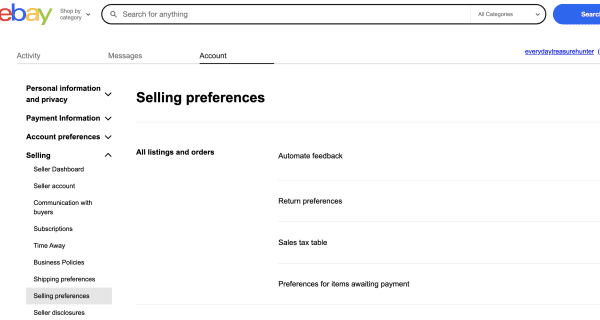
1. Stop the “Non-Paying Buyer” Cycle
We’ve all been there. You sell a big item, you’re hyped, and then… silence. The buyer never pays, and your item is stuck in “Pending” for a week.
- The Pro Fix: Turn on the Preferences for items awaiting payment. (find it in your Selling Preferences within My eBay > Selling > Account > Selling Preferences)
- How it works: You can set it to automatically cancel an order if the buyer hasn’t paid within 4 days.
- Why you need it: This gets your item back in front of real buyers immediately. While you’re in there, set your “Buyer Requirements” to block repeat offenders. If a buyer has a history of not paying other sellers, they shouldn’t be allowed to mess with your store.
2. Speed Up Your Listing with “Business Policies”
If you find yourself manually typing in “USPS Ground Advantage, 12 ounces, $6.50” every single time you list an item, you are wasting your life.
- The Pro Fix: Enable Shipping Business Policies. (just scroll down in selling preferences)
- How it works: You create “templates” for your shipping. For example, I have one called “Small Item” (First Class/Ground) and one called “Heavy Item” (UPS).
- Why you need it: When you list a new item, you just click your “Small Item” policy and you’re done. It shaves minutes off every listing, which adds up to hours over a month.
- Check out these for shipping
3. Protect Your SEO with “Out-of-Stock Control”
In the world of eBay, “Search Engine Optimization” (SEO) is king. If you have a listing that has sold 5 copies and you run out, eBay usually ends the listing. When you find more, you have to start from zero with no “sales history.”
- The Pro Fix: Turn on Out-of-Stock Control.
- How it works: Instead of ending the listing when the quantity hits zero, the listing stays “alive” but becomes invisible to buyers.
- Why you need it: When you find that item again, you just update the quantity. You keep all your “sold” history and your high ranking in the search results. Google loves listings with history!
4. Draw Your Boundaries (Exclude Shipping Locations)
International shipping can be great, but it can also be a nightmare. Some countries have notoriously bad postal systems or high rates of “lost” packages.
- The Pro Fix: Use the Exclude Shipping Locations list.
- How it works: You can manually check off regions or countries where you don’t feel comfortable shipping.
- Why you need it: If you’re selling a $300 item, you don’t want to risk it going to a country where tracking stops at the border. Protect your high-value wins by only shipping where you know it’s safe.
5. Build a “Bouncer” at the Door (Buyer Requirements)
Not every customer is a good customer. Some accounts are created just to troll or scam sellers.
- The Pro Fix: Tighten your Buyer Requirements. (same area)
- How it works: Set your account to automatically block buyers who have a low feedback score (like -1 or below) or who have multiple unpaid item strikes.
- Why you need it: This is your store’s “bouncer.” It filters out the people who are statistically most likely to cause you a headache, leaving you more time to help your great customers.
6. Don’t Get Bit by the Tax Man (Sales Tax Table)
eBay handles a lot of the heavy lifting for sales tax now, but you still need to be aware of how it’s being applied to your invoices.
- The Pro Fix: Review your Sales Tax Table.
- How it works: This ensures that if you are selling to certain states or regions where you are required to collect tax, the numbers are accurate.
- Why you need it: You never want to reach the end of the year and realize you were supposed to be collecting a fee that you ended up paying out of your own pocket.
The “Everyday Hunter” Bottom Line
Knowledge is the most important tool in your kit. You can have the best items in the world, but if your back-end settings are a mess, you’ll spend all your time fixing problems instead of finding new treasure.
Spend 20 minutes today locking down these settings. Your future self will thank you.